
Power Units with 9VDC
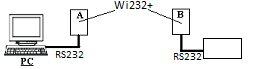
Connect to SSID XpicoWiFi_xxxxxx. The xxxxxx will correspond with the Mac address on the bottom of the Can-WIFI unit.
- Password - XPICOWIFI
Enter 192.168.0.1 in the browser to enter the configuration.
- User Name – admin
- Password – PASSWORD
Select Tunnel from the list on the left
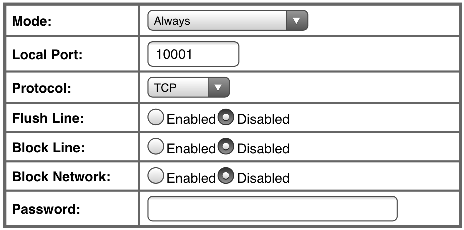
Unit A – Server
Choose “Tunnel 1” and “Accept” at the top of the page

Choose the settings in the picture below for basic set up. You can enter a different Port or Mode if it is needed for the application.
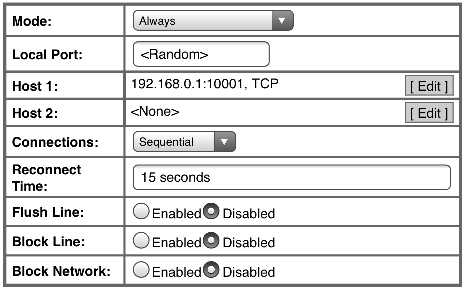
Unit B - Client
Choose “Tunnel 1” and “Connect” at the top of the page

Choose the settings in the picture below for basic set up.
Quick Connect
On unit B, Go to the tab at the top of the list on the left labeled QuickConnect .
Connect to the SSID being broadcast by unit A.
- Password - XPICOWIFI
Comments
0 comments
Please sign in to leave a comment.